Who it is for
- Analysts, engineers, and junior DBAs who run queries regularly.
- Teams that need consistent habits across multiple environments.
- People who want clearer review notes and safer screenshots.

Education intake landing
We are forming a small education cohort to practice connection context, query review routines, result verification checks, and team-friendly troubleshooting notes.
Disclosure and trademark note
This site is an independent education resource and does not imply endorsement. DBeaver is a trademark of its respective owners. This site provides training notes only and does not distribute software files.
Quick links to the cohort outline, timeline, and contact options.
Tip: use the “Find a topic” search to filter the matrix and vocabulary list. Back to top
A guided, practice-focused track for people who use DBeaver in real work and want calmer review routines.
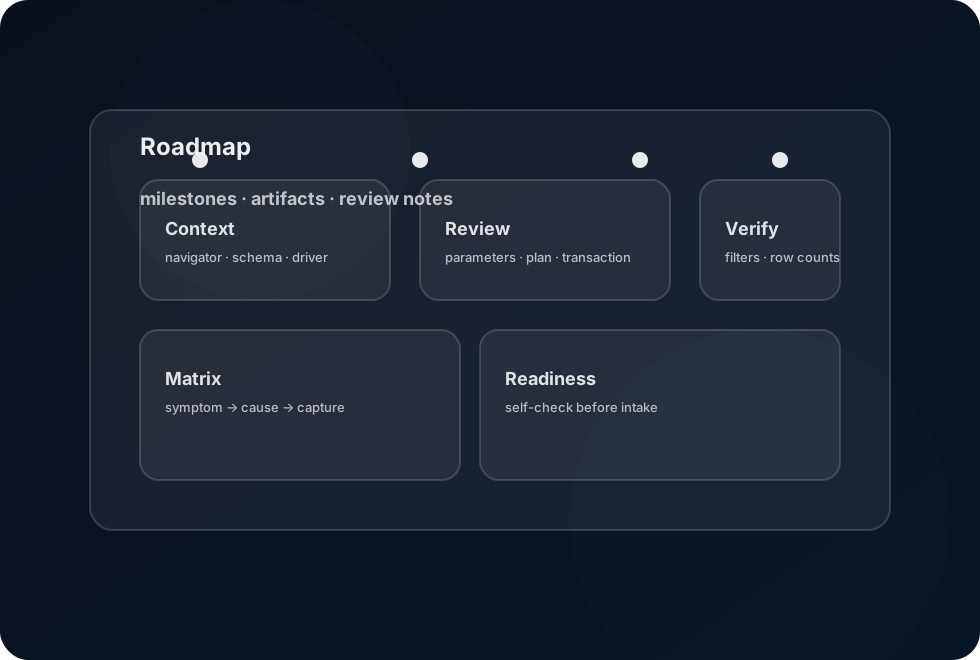
A short sequence of milestones. Each step produces an artifact you can reuse.
Focus: environment naming, driver expectations, schema visibility, and navigator filters. Artifact: a personal “context check” checklist you can run in under two minutes.
Focus: readable SQL structure, parameters, explain plan cues, and transaction awareness. Artifact: a review template you can paste into a ticket or pull request.
Focus: row counts, filters, sorting, spot checks, and “what changed” comparisons. Artifact: a result-review checklist that works across result grids and exports.
Focus: turning recurring issues into a shared table: symptoms, likely cause, and what to capture. Artifact: a troubleshooting matrix you can adapt for your environment.
Use search to filter rows by term: schema, driver, transaction, navigator, plan, filter.
| Module | Terms used | Practice artifact |
|---|---|---|
| Context check | navigator, schema, driver, privileges | 2-minute checklist for environment confidence |
| Transaction awareness | transaction, autocommit, commit, rollback | short note on safe sequences for changes |
| Readable SQL | parameters, formatting, explicit columns | reviewable query template and comment style |
| Plan cues | explain plan, scan, index, join | a “plan review” checklist for risky queries |
| Result verification | result grid, filters, sort, row count | result-review checklist for sanity checks |
| Troubleshooting notes | timeout, auth, schema visibility | team matrix: symptom → cause → what to capture |
A quick self-check before you message us about joining the cohort.
Short definitions for the terms used in the curriculum matrix.
A tree view of connections and objects (schemas, tables, views). Use it to confirm context before you query.
The database protocol layer used by the connection. If a feature behaves differently, confirm you are using the expected driver type and version.
A grouped unit of work. Understanding commit/rollback behavior helps you avoid surprising changes.
A namespace for tables and other objects. If you query without qualifying names, confirm the schema search rules for your database.
A preview of how the database intends to run a query. Use it to detect full scans, missing indexes, and expensive joins.
A placeholder value you fill in at runtime. It keeps queries readable and reduces the temptation to edit SQL repeatedly.
Answers to the questions we get during intake.
No. This is an independent education resource. DBeaver is a trademark of its respective owners.
No. This site contains training notes and reference material only.
Avoid connection strings, hostnames, usernames, IP addresses, or customer identifiers. Share only what is necessary for the question and redact environment-specific details.
Include: your database type, the driver you expect, the schema context, the query goal, what you observed in the result grid, and the smallest reproducible example you can share without sensitive details.
Use the form to ask about the cohort, the curriculum, or a workflow you want to practice.
Note: This page is not affiliated with the DBeaver project. Use it as an education outline.